PORT ENERJI
Port Energy is an energy management platform integrated with Port Wallet, designed to simplify the electric vehicle experience for Renault and Dacia users.
Home Dashboard
This is the main entry point of the app.
Key vehicle information, monthly spending, and the latest transaction are displayed at a glance.
Quick-access actions such as Add Vehicle, Add Card, My Transactions, and EV Charging streamline navigation.
A bottom navigation bar provides easy access to the app’s primary sections.

Three Charging & Fuel Workflows
The system supports three separate operational flows, each designed for different types of vehicle usage:
-
Fuel-Based Flow – For combustion-engine vehicles, enabling users to track fuel expenses, view past transactions, and manage vehicle details.
-
Direct Charging Flow (Electric EV Charging) – For electric vehicles charging instantly at public charging stations, with real-time session progress and payment integration.
-
Reservation-Based Charging Flow – For electric vehicle users who need to pre-book a charger, allowing time-slot selection, session confirmation, and pre-authorized payment handling.
These three flows operate under a unified experience, ensuring that different vehicle types and charging scenarios are managed seamlessly within the same interface.
Add Vehicle


Card Selection & Authorization Hold
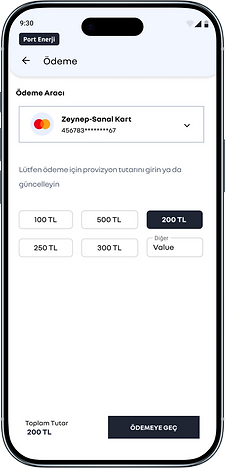


I designed the Payment Method Selection & Pre-Authorization flow to reduce cognitive load and prevent errors. Card selection opens as a bottom sheet; amount entry is accelerated with chips and a free-value field. The total hold is persistently shown in the bottom bar, and a single primary CTA keeps the flow focused. The success screen offers next-best actions such as “set up automatic top-up” and “view transaction details.” For security and compliance, card data is masked, 3DS is supported, and inline validation guards against input errors.
EV Charging Stations: Explore, Filter, Go


I simplified the map experience around a discover → evaluate → navigate flow. Operator selection and filters sit in the top bar; a list/map toggle lets users switch context without losing place. Pins use clustering and smart dispersion; tapping a pin opens a bottom-sheet mini card with one-tap actions: Get Directions or View Details. If a session is active, a persistent status bar surfaces time and quick return actions. Bottom navigation is arranged with a centered FAB to avoid collisions with map CTAs. Result: a one-hand-friendly, fast-decision, low-error station discovery experience.
Home Charging Reservation-Free Streaming


Home Charging Reservation Flow


Charge Start & Session Control (QR / Code / Reservation)


I unified three entry modes—Scan QR, Enter Code, and Start from Reservation—under one coherent pattern. Amount chips + free input, contextual guidance to plug–confirm–start, real-time session metrics, and a readable Charge Summary. Reservations include status badges and quick actions. Fast start, fewer errors, clean finish.
Charging Session States


With the newly added charge state model, the project wraps. The session’s full lifecycle—ready, connecting, charging, paused, completing, completed / error—is visualized with clear status badges, icon-plus-text alerts, and feedback that does not rely on color alone. Map, station, payment, and summary flows are unified under one design language, reducing cognitive load while strengthening error prevention and accessibility (WCAG 2.1 AA). The result: users start faster, always know where they are in the flow, and end sessions confidently.